


How to install App

IOS
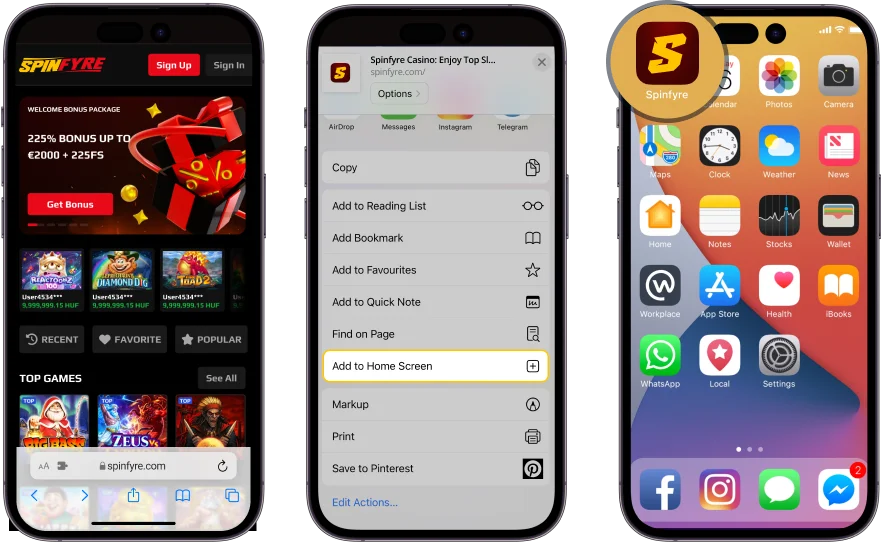
1. Open SpinFyre Casino in Safari browser on your iOS device.
2. Tap the “Share” button.
3. Scroll down and tap “Add to Home Screen".

Android
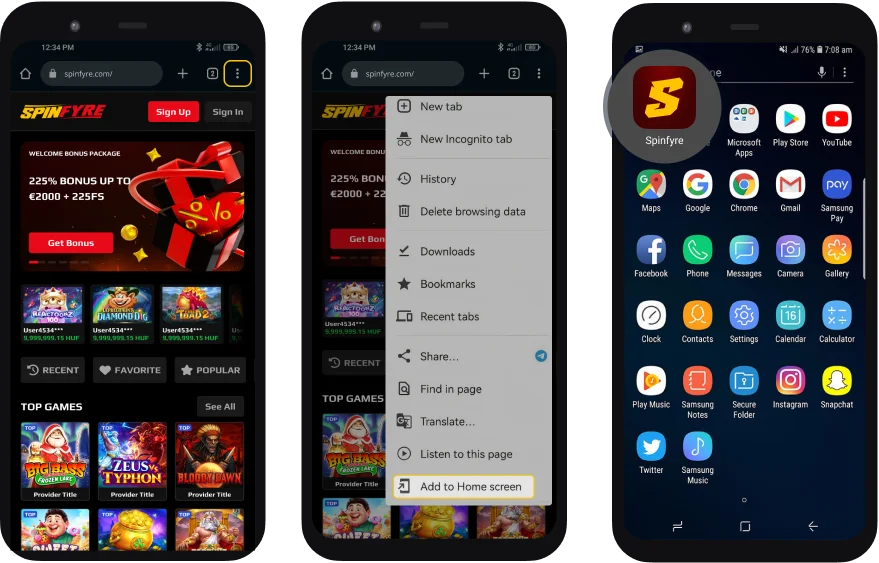
1. Open SpinFyre Casino in Chrome browser on your Android device.
2. Click on “Three dots” on the top right.
3. Click the “Install app” button and tap “Install”.
SpinFyre App – The Full Casino in Your Browser, No Download Required
The SpinFyre app is a Progressive Web App — a browser-based application that installs directly from this page onto your iOS or Android home screen in under thirty seconds, without visiting the App Store or Google Play, without creating a new account, and without occupying significant storage space on your device. Once installed, it opens full-screen with a home screen icon identical in appearance and tap-to-launch behaviour to any native app, giving you one-tap access to the complete SpinFyre casino — every slot, live dealer table, sportsbook market, jackpot title, mini game and tournament — from your device's home screen.
Everything available on the SpinFyre desktop platform is available in the PWA without any reduction in the game catalogue, betting functionality or account management features. The Live Casino streams in full HD. Bonus Buy is available on all eligible slots. The SpinFyre Sport sportsbook delivers real-time in-play odds and cash-out on qualifying bets. Deposits, withdrawals, responsible gaming tools, VIP Club access and the Promotions page are all accessible within the PWA with no functionality reduced relative to the full desktop platform. Current active offers are on the Promotions page.
SpinFyre is operated by Fortuna Games N.V. and licensed by the Curaçao Gaming Authority under licence OGL/2024/112/0974. 18+ only. Please play responsibly.
How to Install the SpinFyre PWA on Android
Installing the SpinFyre PWA on an Android device takes under thirty seconds from any Chrome, Edge or Samsung Internet browser. The process does not require a Google Play account and does not trigger any app store review or download queue.
Open your Android browser and navigate to spinfyre.io. Chrome will display an install prompt — either a banner at the bottom of the screen reading "Add SpinFyre to Home Screen" or an icon in the browser address bar. Tap the prompt and confirm the installation. The SpinFyre icon will appear on your home screen immediately. If the automatic prompt does not appear, open the Chrome browser menu — the three-dot icon in the top right corner — and select "Add to Home Screen" from the menu options. Confirm by tapping "Add" and the installation completes.
| Step | Action |
|---|---|
| 1 | Open Chrome, Edge or Samsung Internet on your Android device |
| 2 | Navigate to spinfyre.io |
| 3 | Tap the install banner at the bottom of the screen — or open the browser menu (⋮) and select "Add to Home Screen" |
| 4 | Tap "Add" to confirm |
| 5 | The SpinFyre icon appears on your home screen — tap it to launch |
The SpinFyre PWA on Android supports the full game catalogue, live casino streaming, sportsbook in-play betting, Bonus Buy, deposit and withdrawal, and all responsible gaming tools available on desktop. The PWA updates automatically — you will always be playing the current version of SpinFyre without any manual update process.
How to Install the SpinFyre PWA on iPhone and iPad (iOS)
Installing the SpinFyre PWA on an iPhone or iPad requires Safari — Apple's built-in browser — and takes under sixty seconds. The PWA cannot be installed from Chrome or Firefox on iOS due to Apple's browser policy. If you are currently using a different browser on your iPhone, open Safari before beginning the installation.
| Step | Action |
|---|---|
| 1 | Open Safari on your iPhone or iPad |
| 2 | Navigate to spinfyre.io |
| 3 | Tap the Share icon at the bottom of the Safari screen — the square with an upward arrow |
| 4 | Scroll down the Share sheet and tap "Add to Home Screen" |
| 5 | Tap "Add" in the top right corner to confirm |
| 6 | The SpinFyre icon appears on your home screen — tap it to launch in full-screen mode |
Once installed, the SpinFyre PWA launches from your home screen in full-screen mode — the Safari address bar and navigation controls are hidden, giving you the maximum available screen area for the game interface. Returning to the home screen or switching to another app does not end your session — the SpinFyre PWA resumes from where you left it when you relaunch.
PWA vs Native App vs Browser – What's the Difference
The SpinFyre PWA delivers a playing experience that is comparable to a native app in performance, home screen access and full-screen interface, while retaining the cross-device compatibility and zero-storage-footprint advantages of a browser-based product. Understanding how it compares to the alternatives helps clarify why SpinFyre uses PWA technology rather than an App Store or Google Play native app.
| Dimension | SpinFyre PWA | Native App (App Store / Google Play) | Mobile Browser (no install) |
|---|---|---|---|
| Installation | Direct from browser — 30 seconds, no store account required | App Store or Google Play download — store account required | No installation — open URL each time |
| Storage space | Minimal — PWA caches assets in browser, does not occupy app storage | Significant — full app bundle stored on device | None |
| Home screen access | Yes — icon on home screen, one-tap launch | Yes — icon on home screen, one-tap launch | No — must open browser and type URL each session |
| Full-screen mode | Yes — browser chrome hidden on launch from home screen | Yes | No — browser address bar and controls visible |
| Updates | Automatic — always current, no manual update required | Manual — must update via App Store / Google Play | Automatic — always current |
| iOS and Android support | Both — single PWA works on all devices | Separate apps required for each platform | Both |
| App Store restrictions | None — PWA bypasses app store approval entirely | Subject to App Store and Google Play gambling content policies | None |
| Game catalogue | Complete — same catalogue as desktop | Variable — native apps often carry reduced game lists | Complete — same catalogue as desktop |
The primary reason SpinFyre uses a PWA rather than a native app is the combination of cross-platform reach, zero app store dependency and the ability to maintain a single unified game catalogue across every device. Apple and Google impose content policies on gambling applications in their stores that create constraints on what can be offered — the PWA bypasses these constraints entirely, allowing SpinFyre to offer the full game library, all promotional features and all responsible gaming tools without modification on every iOS and Android device.
What's Available in the SpinFyre PWA
Every feature of the SpinFyre platform is available in the PWA without reduction or modification. The following summarises the key sections and their PWA availability.
| Section | PWA Available | Key Features in PWA |
|---|---|---|
| Slots — all categories | Yes — complete catalogue | Full game play, Bonus Buy, demo mode, autoplay, all in-game features |
| Live Casino | Yes — HD video stream | Full HD live stream, all bet types, side bets, live chat with dealer |
| SpinFyre Sport | Yes — full sportsbook | Pre-match and in-play markets, live odds, cash-out, Bet Builder |
| Jackpot Slots | Yes | Real-time jackpot values, all jackpot tiers, full game play |
| Mini Games | Yes | Crash games, instant win, virtual sports — all formats |
| Tournaments | Yes | Live leaderboard, eligible game access, real-time position updates |
| Promotions | Yes | All active offers, claim process, full terms |
| VIP Club | Yes | Level progress, rewards, account manager contact |
| Lucky Boxes & Coin Shop | Yes | Coin balance, shop access, Lucky Box opening |
| Daily Missions | Yes | Mission dashboard, progress tracking, reward collection |
| Deposits & Withdrawals | Yes | All payment methods, crypto and e-wallet support |
| Responsible Gaming Tools | Yes | Deposit limits, session limits, self-exclusion — all tools |
Performance – How the SpinFyre PWA Delivers a Consistent Mobile Experience
The SpinFyre PWA uses service worker technology to cache essential platform assets — game loading libraries, interface components, static assets — on your device after the first session. This means that on subsequent launches, the platform interface loads from local cache rather than from the server, producing significantly faster startup times than a standard browser visit. Game content and live data — slot game outcomes, live casino video streams, real-time sports odds — are still fetched from the server on each session, as these cannot be cached without compromising the integrity of game outcomes.
Adaptive video streaming ensures that Live Casino streams adjust their bitrate in response to your current connection speed. On a strong 4G, 5G or Wi-Fi connection, the live dealer stream defaults to the highest available resolution. On a slower connection, the stream quality reduces automatically to maintain smooth playback rather than producing buffering interruptions. This adaptive behaviour is handled without requiring any manual quality setting from the player.
The SpinFyre PWA has been tested on iOS 16 and above on iPhone and iPad, and on Android 10 and above across a range of device specifications including mid-range and entry-level devices from the most common manufacturers. If you experience any performance issues with the PWA on your specific device, please contact our support team at [email protected] or via live chat.
Security – How the SpinFyre PWA Protects Your Account
The SpinFyre PWA runs exclusively over HTTPS — the same encrypted connection protocol used by banking applications and financial services platforms. Every data transmission between your device and the SpinFyre server — login credentials, deposit transactions, game outcome data, personal information — is encrypted in transit. The padlock icon in the browser address bar before installation confirms the active HTTPS connection.
The SpinFyre PWA does not store your login credentials on your device. If you log out of your account, re-authentication is required on the next launch — the PWA does not retain session tokens beyond a logged-out state. For players who want the convenience of faster re-authentication on a personal device, modern iOS and Android devices support biometric login via Face ID, Touch ID or fingerprint scanner through the browser's built-in credential management — this can be configured in your device settings and allows login without typing your password on each session.
Because the SpinFyre PWA updates automatically from the server on each session, it always runs the most current version of the platform including any security patches applied since your last session. There is no risk of running an outdated version of the platform with unpatched security vulnerabilities — a genuine risk with native apps where players may delay or skip manual updates.
Responsible Gaming on Mobile
Every responsible gaming tool available on the SpinFyre desktop platform is fully accessible within the PWA — deposit limits, session time limits, reality checks, cool-off periods and self-exclusion are all available from the account settings panel without requiring a switch to a desktop device. If you set a limit on your mobile device, it applies immediately across every access point to your account — desktop, mobile browser and PWA simultaneously.
The mobile format of the SpinFyre PWA makes responsible gaming tools more accessible, not less — you do not need to be at a desktop computer to adjust your limits, check your session history or initiate a self-exclusion period. All of these actions are available within the account settings section of the PWA at any time. If you need to speak with a member of our support team about your account, live chat is available 24/7 within the PWA or by email at [email protected]. Full responsible gaming information is on the Responsible Gaming page. 18+ only.